16. Release process
A release is produced by one GitHub Actions workflow, “Release New Version”, defined in .github/workflows/release.yml. It bumps the version, regenerates the changelog, tags the commit, publishes a GitHub release, builds the documentation, and pushes the container image. This page describes that pipeline as it is; the steps that need a person are marked.
16.1. Versioning
C-PAT uses semantic versioning. The version the workflow reads is the one in api/package.json; it writes the new value to that file, to client/package.json, to release and version in docs/conf.py, to C-PAT/C-PAT.json, and to info.version in api/specification/C-PAT.yaml. No one edits those values by hand. Tags are the bare version, 1.4.4, with no v prefix, and are annotated. Only the current release receives fixes; see Project and resources.
16.2. Branches
development is the integration branch and main is the release branch. Pull requests target development and the PR Tests workflow runs on both branches. Before a release, development is merged into main; the release workflow checks out main and works there.
16.3. Run a release
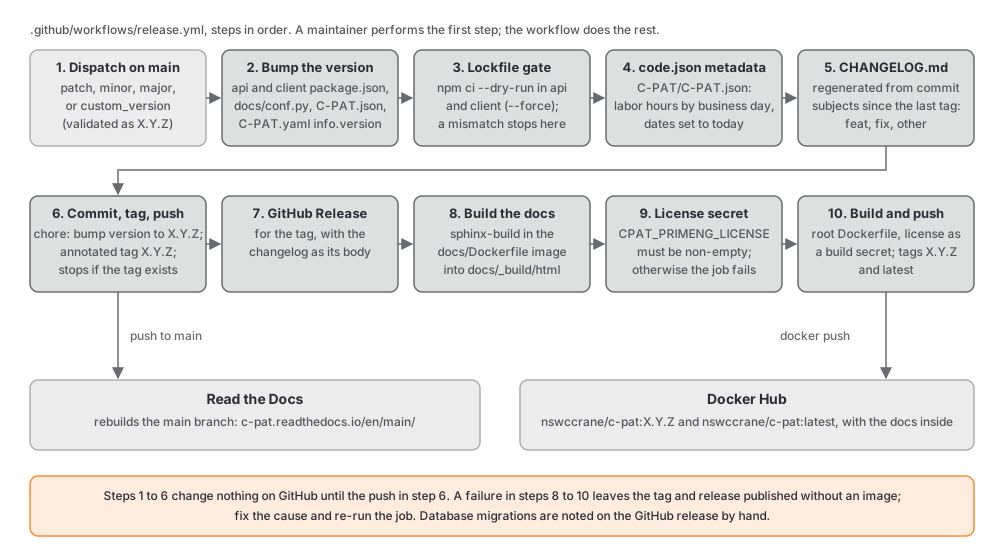
A maintainer starts the release; everything after the first step is the workflow.
In the repository’s Actions tab, choose Release New Version and Run workflow. Pick
patch,minor, ormajor, or entercustom_versionasX.Y.Zwith an optional suffix (the workflow validates it against^[0-9]+\.[0-9]+\.[0-9]+([.-][a-zA-Z0-9]+)*$).The workflow reads the current version from
api/package.jsonand computes the new one.It writes the new version into the five files listed above, using
npm version --no-git-tag-version --ignore-scriptsinapi/andclient/andsedfor the others. One furthersededitsapi/bootstrap/middlewares.jsfor a user-agent string that no longer lives there (it moved toapi/utils/tenableProxy.jsand now derives frompackage.json), so that step changes nothing.It verifies that both lockfiles match their manifests by dry-running the installs:
npm ci --dry-run --omit=dev --ignore-scriptsinapi/andnpm ci --dry-run --force --ignore-scriptsinclient/. A lockfile out of sync stops the release here, before anything is pushed.It updates
C-PAT/C-PAT.json, the federal code inventory record:laborHoursgrows by eight hours for every business day sincedate.lastModified, andlastModifiedandmetadataLastUpdatedare set to today.It regenerates
CHANGELOG.mdfrom the commit subjects since the last tag. The file is overwritten, not appended. Subjects starting withfeatgo under New Features,fixunder Bug Fixes, andbuild,chore,ci,docs,perf,refactor,revert,style, andtestunder Other Changes; merge commits are excluded. Anything else is dropped, which is why commit subjects follow Coding standards.It commits the changed files as
chore: bump version to X.Y.Z, stops if a tag with the new version already exists, creates the annotated tag, and pushes the commit and the tag.It publishes a GitHub release for the tag with the changelog as its body.
It builds the documentation in a container,
docker run --rm -v $(pwd):/docs docs-builder sphinx-build -b html . _build/htmlfromdocs/, so that the image carries the documentation for its version.It checks that the
CPAT_PRIMENG_LICENSErepository secret is set and stops if it is empty.It builds the image from the root
Dockerfilewith the license passed as a build secret and pushesnswccrane/c-pat:X.Y.Zandnswccrane/c-pat:latestto Docker Hub.
16.4. After the release
Read the Docs rebuilds the
mainbranch on push and publishes it athttps://c-pat.readthedocs.io/en/main/. Check that the build succeeded.Pull the new image and start it against a copy of a real database to confirm that migrations run and the client loads. The installation guide tells deployers to expect a longer first start when a release includes a migration.
Edit the GitHub release to add anything the generated changelog cannot know, in particular a note that the release includes a database migration, because C-PAT Setup and Technical Information promises deployers that note.
16.5. Hotfixes
A fix that cannot wait for the next merge of development is branched from main, merged there, and released with a patch bump. Merge or cherry-pick it back into development afterwards; the history contains pairs of commits with the same subject and different hashes from exactly this pattern.
16.6. Failure modes
Condition |
Result |
|---|---|
The custom version is not valid semantic versioning |
The workflow stops at the version step. Nothing is changed. |
A lockfile does not match its manifest |
The workflow stops at the dry-run installs. Nothing is committed or pushed. |
A tag with the new version already exists |
The workflow stops before tagging. The bump commit exists on the runner only and is not pushed. |
The |
The commit, tag, and GitHub release already exist, but no image is built. Set the secret and build the image by hand, or re-run the job. |
The documentation build fails |
Same as above: the release exists and the image does not. The PR docs job exists to catch this earlier. |
16.7. Pre-release checklist
The PR Tests workflow is green on
development, including thedocsjob.Every schema change since the last release has a migration and is noted for the release notes.
Dependency changes came with regenerated lockfiles (the dry-run gate will catch a miss, but only after the version bump).
developmentis merged intomainandmainbuilds.Commit subjects since the last tag read well as changelog lines.