6. Database and migrations
MySQL is the only database C-PAT supports, and it is the only place application state lives. This page explains how the API talks to it, how a schema is created and evolved, and the permission tables that need the most care. The steps for adding a migration are in Add a database migration; the deployer’s view of the database is in Database.
6.1. Engine and requirements
The API checks the server version at startup against minMySqlVersion in api/Services/utils.js, which is 8.0.24 as of 1.4.4, and refuses to start against anything older. The pool connects with the utf8mb4_0900_ai_ci charset and collation, and every table in the baseline schema uses the same, so all text columns hold full Unicode.
The pool sets timezone: 'Z'. Date and time values travel as UTC between the API and the server, and the baseline schema sets TIME_ZONE='+00:00' while it runs. Treat every DATETIME column as UTC.
The MySQL event scheduler must be on. Migration 0008.js creates a stored procedure, daily_poam_status_update, and an event, daily_poam_status_update_event, that runs it to move overdue POAM records to their expired status; 0014.js replaces the procedure with a later version. With the scheduler off, the event never fires and POAM statuses stop expiring.
6.2. Connection pool
api/Services/utils.js creates one mysql2 promise pool at startup and exports it as pool. Its configuration as of 1.4.4:
Setting |
Value |
|---|---|
|
|
|
|
|
|
|
|
|
Converts |
Per-connection setup |
|
TLS |
Enabled when |
Services acquire a connection per call with a helper that every service file defines locally. It is repeated in 35 files rather than shared, so expect to see it wherever you look:
async function withConnection(callback) {
    const connection = await dbUtils.pool.getConnection();
    try {
        return await callback(connection);
    } finally {
        connection.release();
    }
}
Writes that touch more than one statement use dbUtils.withTransaction(callback) from the same utilities module, which begins a transaction, commits when the callback returns, rolls back when it throws, and always releases the connection. dbUtils.retryOnDeadlock(fn, statusObj) wraps operations that can deadlock under concurrent approvals: it retries ER_LOCK_DEADLOCK up to 15 times with a fixed 200 millisecond delay and ER_LOCK_WAIT_TIMEOUT twice, and records the retry count on the response so the request logger can report it.
api/utils/PoolMonitor.js watches the pool. When the last connection is removed, it marks the database unavailable in the process state, which makes the availability gate answer 503, and retries the preflight every 20 seconds until the server is back. A database restart therefore does not need an API restart. See Architecture overview.
6.3. Bootstrapping an empty schema
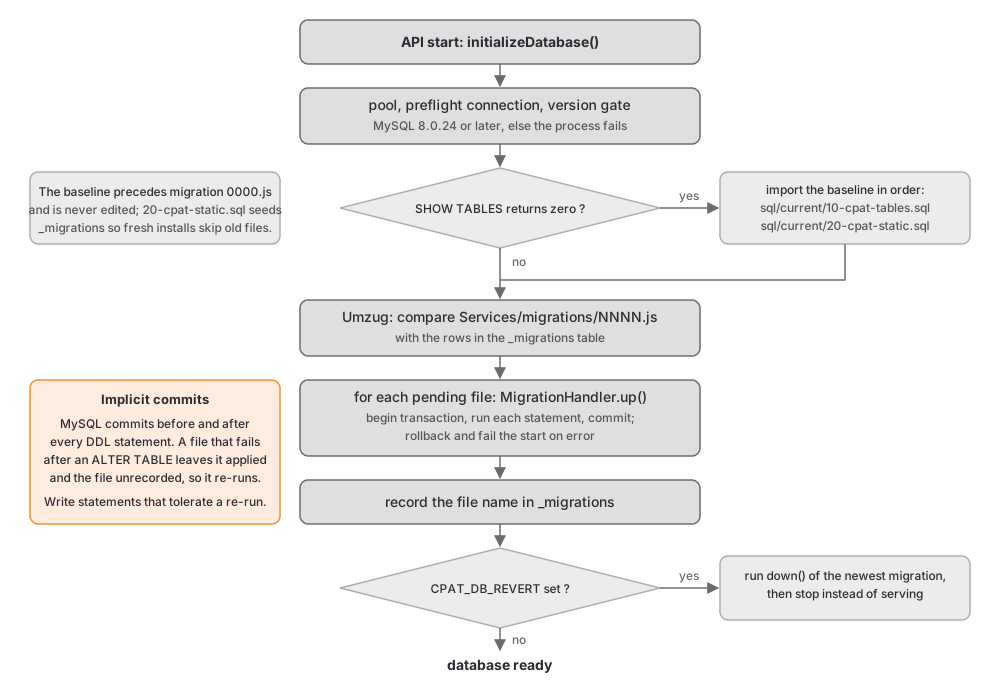
setupSchema() in api/Services/utils.js runs during startup. It counts the tables in the configured schema with SHOW TABLES. When the count is zero, it imports every file in api/Services/migrations/sql/current/ in directory order using the vendored importer in api/Services/migrations/lib/mysql-import.js:
10-cpat-tables.sqlcreates the 25 baseline tables, from_migrationsthroughpoammilestones, together with four triggers onpoamapproversandpoam.20-cpat-static.sqlseeds two tables:_migrations, which records the migrations the baseline already incorporates, andthemes, the marketplace theme catalogue.
After the import, and on every start whether or not the schema was empty, Umzug compares the migration files with the _migrations table and applies any that are missing. The seeded _migrations rows are what stop a fresh installation from re-running migrations whose effect is already in the baseline.
Warning
10-cpat-tables.sql is the baseline that precedes migration 0000.js. It is not a snapshot of the current schema and it is never regenerated on a schema change. A schema change is always a new migration file. Editing the baseline instead would make a fresh installation and an upgraded installation diverge, and the seeded _migrations rows would no longer describe what the baseline contains.
api/Services/migrations/sql/generateSchema.sh is the script that produced the baseline. It dumps a local database with root credentials and writes into sql/ rather than sql/current/. Treat it as a record of how the baseline was made, not as a tool to run.
6.4. Migration files
Migrations live in api/Services/migrations/ and are named with four digits and nothing else: 0000.js through 0027.js as of 1.4.4. doMigrations() in api/Services/utils.js configures Umzug with that glob, passes the mysql2 pool as the context, and stores progress through api/Services/migrations/lib/umzug-mysql-storage.js in the _migrations table, which has createdAt, updatedAt, and name columns. After the run, the highest applied number is kept as config.lastMigration for the application information endpoint.
Every migration has the same shape. It builds a MigrationHandler from an array of up statements and an array of down statements and exports the two functions Umzug calls:
const MigrationHandler = require('./lib/MigrationHandler')

const upMigration = [
    `ALTER TABLE poam ADD COLUMN example VARCHAR(255) NULL`
]

const downMigration = []

const migrationHandler = new MigrationHandler(upMigration, downMigration)

module.exports = {
    up: async (pool) => {
        await migrationHandler.up(pool, __filename)
    },
    down: async (pool) => {
        await migrationHandler.down(pool, __filename)
    }
}
MigrationHandler.up takes one connection from the pool, begins a transaction, runs each statement in order, and commits. It logs a ('mysql', 'migration') record with status: 'start' before the first statement, status: 'running' with the statement text before each one, status: 'error' with the message on failure, and status: 'finish' at the end. On failure it rolls back and rethrows, so Umzug does not record the file and the API startup fails.
Warning
The transaction protects data statements only. MySQL commits implicitly before and after every DDL statement, so an ALTER TABLE that has already run stays applied when a later statement in the same file fails. The file remains unrecorded and runs again on the next start, and the ALTER TABLE then fails because the column exists. Write every statement so that running it twice is harmless, and keep data backfills after the DDL they depend on. Add a database migration shows the patterns.
All 28 migrations as of 1.4.4 have an empty down array. Setting CPAT_DB_REVERT=true makes the API run the down of the newest applied migration and then exit instead of serving, which is useful while developing a migration whose reverse you wrote, and useless otherwise. Downgrading a deployment is not supported; the installation guide says so in C-PAT Setup and Technical Information, and this is why.
6.5. Permission model
Access to data is decided per collection and per user with the numeric access level described in C-PAT Collection Privileges. The tables behind it changed in migration 0026.js, which added three tables next to the original one:
Table |
Role |
|---|---|
|
A level granted to one user on one collection by an administrator. |
|
A level granted to every member of an assigned team on one collection. |
|
A user removed from a team-derived grant on one collection. |
|
The effective level per user and collection, derived from the three tables above. This is the table the services read. |
The effective table is recomputed inside a transaction whenever a source changes: a direct grant, a team grant, an exclusion, a team membership, or a team sync. api/Services/collectionPermissionGrants.js owns the recomputation; api/Services/permissionsService.js and api/Services/userTeamAssignmentService.js call it. The rule that decides the effective level is the highest level from any source, minus exclusions. Read the derived table in services; write only to the source tables through those modules, so the derivation stays correct.
Users are never deleted. Deactivating a user changes accountStatus on the user table, so foreign keys that reference users never cascade and history that names a user stays intact.
6.6. Other database objects
0020.jscreates thehealthchecktable that the five-minute health job writes and the uptime endpoint reads.0014.jscreates the triggerupdate_poam_extension_deadline;0018.jscreatesafter_poammilestoneteams_insertandafter_poammilestoneteams_delete. The baseline createsprevent_created_updateand threepoamapproverstriggers.The stored procedure and scheduled event from
0008.jsand0014.jsare described under Engine and requirements above.
When you change a table that a trigger or the procedure reads, read those objects first; the migration that changes the table must update them in the same file.
6.7. Sequelize
api/utils/sequelize.js initializes Sequelize at require time and registers ten models from api/Models/. One service uses it: api/Services/importService.js, which runs the VRAM spreadsheet import inside a Sequelize transaction. Every other read and write in the API uses the pool directly. api/Models/poamMilestoneTeams.model.js exists but is not registered.
Do not introduce Sequelize into new code. Use the pool, parameterized SQL, and withTransaction.