3. Architecture overview
C-PAT is a single-page web client, a stateless Node.js API, and a MySQL database, with an external OIDC provider for identity and optional connections to STIG Manager and Tenable.sc. This page explains how those parts fit together, what happens when the API starts, how a request becomes SQL and a response, and where configuration comes from. The Backend guide and Frontend guide pages assume you have read it.
3.1. System context
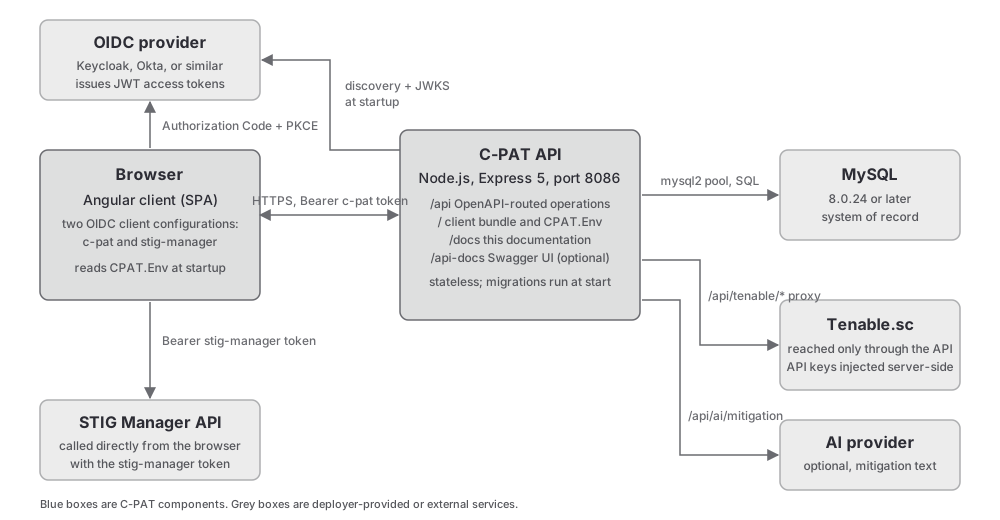
The browser runs the Angular client. It obtains two access tokens from the OIDC provider with the authorization code flow and PKCE: one for the c-pat client and one for the stig-manager client. It sends the first to the C-PAT API under /api and the second directly to the STIG Manager API. The C-PAT API has no STIG Manager client of its own; on the server side, STIG Manager appears only as configuration passed through to the browser (api/bootstrap/client.js) and as a health probe (checkStigManager in api/Services/healthService.js).
Tenable.sc is reached only through the API. The client calls /api/tenable/* operations, and api/utils/tenableProxy.js forwards them to the Tenable REST API with the deployment’s API keys injected server-side. The two integrations differ for one reason: STIG Manager authorizes with the user’s own OIDC token, which the browser already holds, while Tenable.sc authorizes with static keys that must never reach the browser.
The API also calls an AI provider for mitigation text when that feature is enabled (api/Services/aiService.js), reads and writes MySQL through a connection pool, and serves three static things: the client bundle at /, this documentation at /docs, and Swagger UI at /api-docs.
3.2. Repository layout
Path |
Contents |
|---|---|
|
The Node.js API. |
|
Startup: middleware, static client and docs serving, dependency initialization, error handlers, signals. |
|
The OpenAPI contract. It is also the router. |
|
One thin handler module per OpenAPI tag. |
|
Business logic and SQL, one module per subject area, plus |
|
Numbered Umzug migrations and, under |
|
Sequelize models, retained for one import path only. |
|
Configuration, authentication, logging, errors, process state, the Tenable proxy. |
|
Tests for the Node.js test runner. |
|
Feature pages: |
|
Shared components, services, models, directives, constants, and utilities. |
|
The route guard, the two HTTP interceptors, the authentication and inactivity services. |
|
The application shell: navigation, topbar, breadcrumb, footer, theme configurator. |
|
Mock factories, fixtures, and helpers shared by the client tests. |
|
This documentation, built with Sphinx. |
|
The multi-stage production image: builds the client, installs the API, copies the built docs. |
|
The PR test workflow, the release workflow, Dependabot, and the issue and pull request templates. |
|
The federal source code inventory record, maintained by the release workflow. |
3.3. Process model
The API is one Node.js process that holds no application state; everything durable lives in MySQL. The process tracks its own lifecycle in api/utils/state.js, a singleton with the states starting, available, unavailable, fail, and stop and the modes normal and maintenance. Entering fail exits the process with a non-zero code; entering stop closes the database pool and exits cleanly. api/bootstrap/signals.js maps SIGINT, SIGTERM, and SIGHUP to stop, so a container orchestrator can shut the API down gracefully.
Two things run on timers inside the process. api/utils/PoolMonitor.js watches the database pool; when the last connection is removed it marks the database unavailable, retries the preflight every 20 seconds, and marks it available again when the database returns, so a database restart does not require an API restart. api/Services/scheduledTasksService.js uses node-schedule for three jobs: POAM deadline notifications daily at 01:00 (0 1 * * *), a health check every five minutes (*/5 * * * *), and a prune of old health records daily at 02:00 (0 2 * * *). All three are cancelled on shutdown. The database itself runs a scheduled event that moves overdue POAMs to their expired status, which is why the MySQL event scheduler must be on.
3.4. Boot sequence
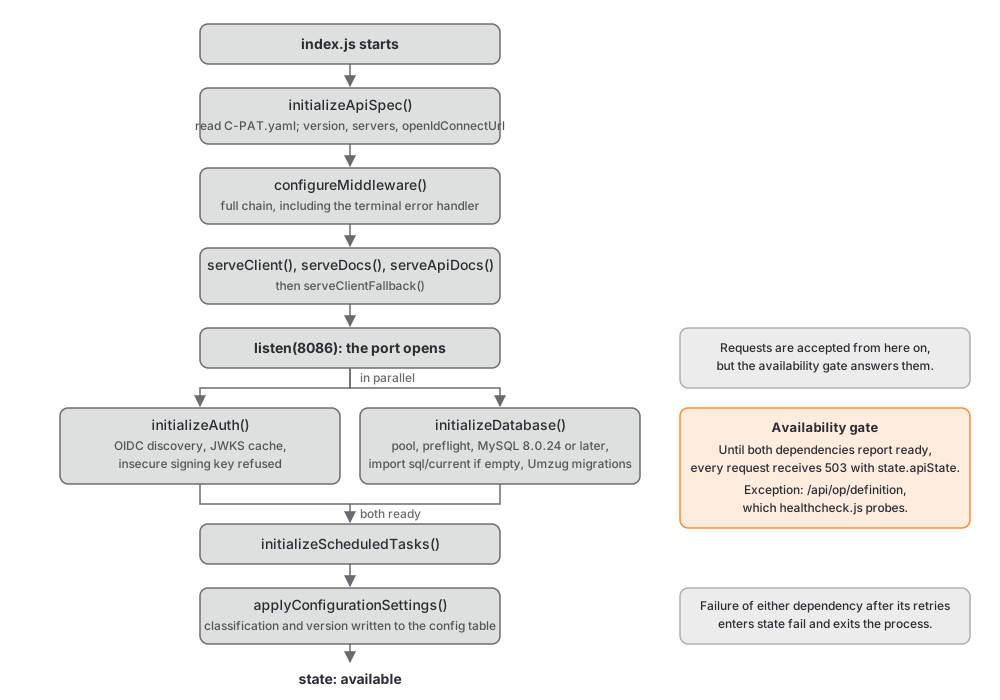
api/index.js runs the steps below in order. Read it alongside api/bootstrap/server.js and api/bootstrap/dependencies.js.
Requiring
api/utils/config.jsloads.envthroughdotenvand reads every environment variable once. Requiringapi/utils/logger.jsreplacesconsole.logand its siblings so that stray console output is logged as an error record.initializeApiSpec()inapi/bootstrap/docs.jsreads the OpenAPI contract and patches it: the version frompackage.json, the server URLs, and the provider’s discovery URL. The patched document becomesconfig.definition.configureMiddleware()registers the middleware chain described in the next section, including the terminal error handler.serveClient()registers/init/Env.jsand the static client bundle;serveDocs()mounts the built documentation at/docs;serveApiDocs()mounts Swagger UI at/api-docswhenCPAT_SWAGGER_ENABLEDistrue;serveClientFallback()registers the single-page fallback that returnsindex.htmlfor navigation requests.startServer()callslisten()on the configured port. Only inside the listen callback doesinitializeDependencies()run, which starts OIDC discovery (fetching the discovery document and the JWKS) and database initialization (creating the pool, checking the MySQL version, populating an empty schema, applying pending migrations) in parallel. When both succeed, the scheduled tasks start andapplyConfigurationSettings()writes the classification and version into the databaseconfigtable. If either fails after its retries, the process entersfail.
Because the port is open before the dependencies are ready, configureServiceCheck in api/bootstrap/middlewares.js answers every request with 503 and a JSON body describing the API state until both dependencies report ready. The one exception is /api/op/definition, which api/healthcheck.js probes. The check is mounted on every path, so the client bundle and /docs are gated as well.
3.5. Request lifecycle
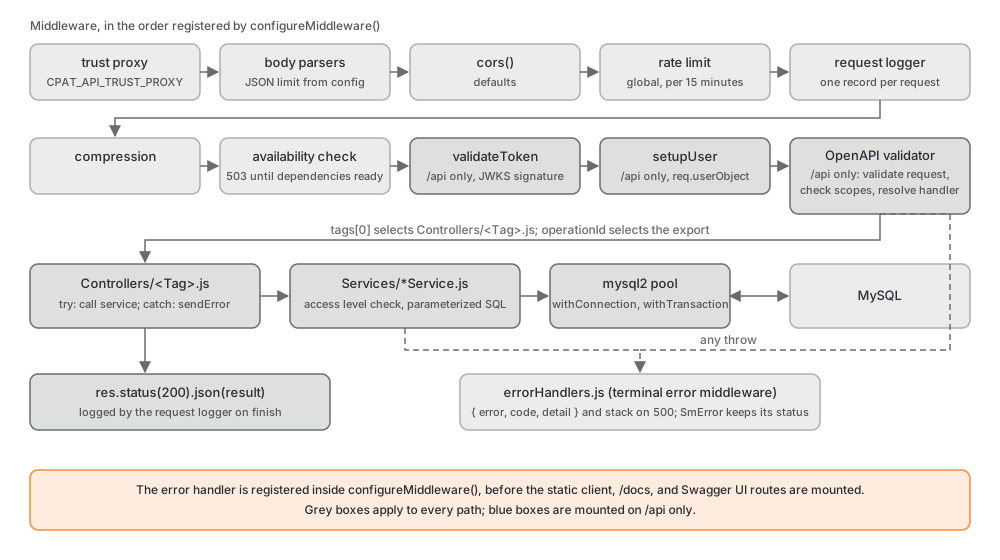
configureMiddleware in api/bootstrap/middlewares.js registers the chain in this order:
Trust proxy, from
CPAT_API_TRUST_PROXY.Body parsers: URL-encoded, text, and JSON with the limit from
CPAT_API_MAX_JSON_BODY.cors()with its defaults.A global rate limiter,
CPAT_API_RATE_LIMITrequests per 15 minutes per address, skipped entirely when the variable is empty.The request logger, which assigns a request id and emits one record per request.
Compression.
The availability check described above.
On
/apionly:validateToken, which verifies the bearer token’s signature against the cached JWKS, andsetupUser, which buildsreq.userObjectand creates the user record on first sight.On
/apionly: theexpress-openapi-validatormiddleware. It validates the request against the contract (unknown query parameters are rejected, and values are not coerced), runs theoauthsecurity handler that checks the token’s scopes, and resolves the handler.The terminal error handler in
api/bootstrap/errorHandlers.js, which turns any thrown error into a JSON body.
The handler resolution is the part that makes the contract the router. modulePathResolver in api/bootstrap/bootstrapUtils.js takes the operation’s first tag as the controller file name and its operationId as the exported function. A request for GET /api/poams/collection/1 therefore matches the /poams/collection/{collectionId} path item, whose get operation carries tags: [Poam] and operationId: getPoamsByCollectionId. The resolver loads api/Controllers/Poam.js and calls its getPoamsByCollectionId export. That controller calls getPoamsByCollectionId in api/Services/poamService.js, which confirms the caller’s access level on the collection, runs parameterized SQL through the pool, and returns rows that the controller sends as JSON. If anything throws, the controller’s catch hands the error to sendError, which maps a known error class to its status code.
One ordering detail matters: the error handler is registered inside configureMiddleware, before the client, docs, and Swagger routes are mounted. Errors thrown by those later handlers do not reach it.
3.6. HTTP surface
Path |
Served by |
|---|---|
|
The OpenAPI-routed operations. The only mount point with authentication. |
|
Swagger UI, when |
|
This documentation, as static files from |
|
The generated runtime configuration script for the client, cached for one hour. |
|
The client bundle. A |
3.7. Runtime configuration
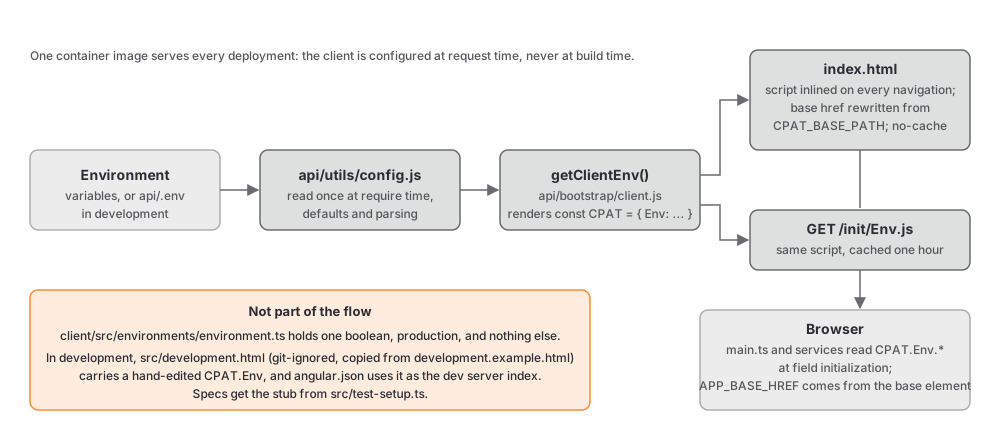
There is one source of configuration, the environment, read once by api/utils/config.js. The API needs nothing else, and the client receives what it needs from the API at runtime. getClientEnv() in api/bootstrap/client.js renders a JavaScript object named CPAT.Env with the OIDC authority and client ids, the API base path, the integration URLs, the timeouts, and a features block of enabled and disabled capabilities. That script is inlined into index.html on every navigation request and is also served at /init/Env.js. On the same request the API rewrites the <base href> element from CPAT_BASE_PATH, which is what allows a deployment under a path prefix; see Deploy at a Subpath.
The client reads CPAT.Env at field-initialization time, in main.ts for the authentication configuration and in every service for the API base. Its Angular environment.ts files carry a single boolean that enables production mode and nothing else. In development, the dev server’s index page, client/src/development.html, carries a hand-edited copy of the same object; see Set up a development environment. The full variable list is in Environment Variables.
3.8. Identity and access
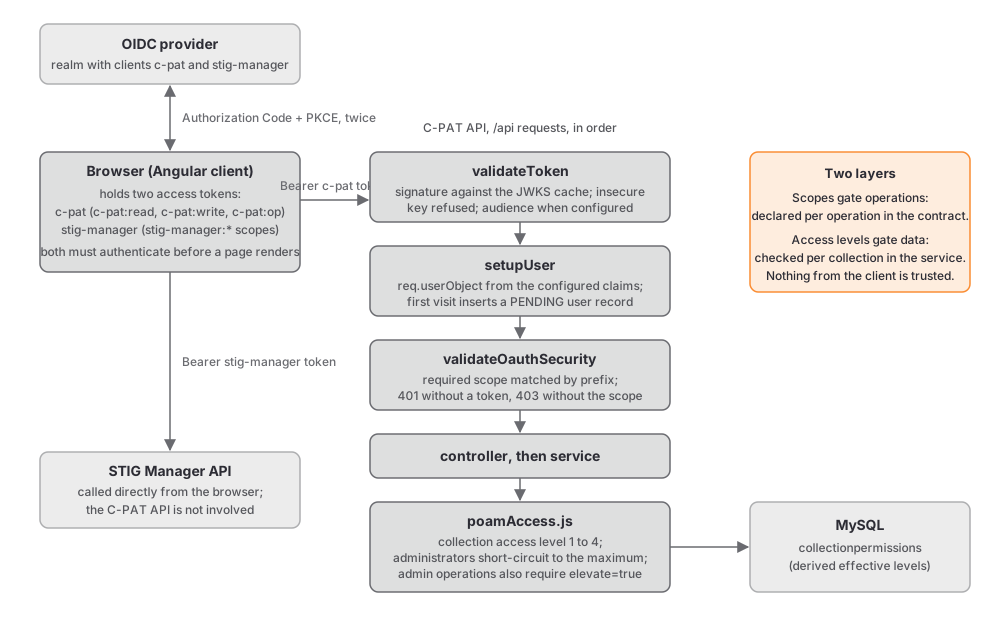
Authentication happens in the browser. The client is configured in client/src/main.ts with two OIDC client configurations against the same authority, and it requires both to authenticate before it renders a page. The authInterceptor attaches the stigman token to requests bound for the STIG Manager API URL and the cpat token to requests bound for the C-PAT API; nothing else receives a token.
The API trusts nothing from the client except the token. validateToken in api/utils/auth.js verifies the signature against a cached JWKS, refreshing the cache when it meets an unknown key id, and refuses a key id it recognizes as a shared demonstration key unless CPAT_DEV_ALLOW_INSECURE_TOKENS is set. It checks the audience when CPAT_JWT_AUD_VALUE is configured. setupUser then builds req.userObject from the configured claims, marks the user as an administrator when the privileges claim contains admin, and inserts the user record on a first visit, which is why new users start with a PENDING account status. See Authentication and Identity for the claims and Configure Users for activation.
Authorization happens in two layers. First, the oauth security handler compares the operation’s required scope (c-pat:read, c-pat:write, or c-pat:op) with the token’s scopes, matching by prefix so that a broader grant satisfies a narrower requirement. Second, the service checks the caller’s access level in the collection that owns the data, using the helpers in api/Services/poamAccess.js: levels 1 to 4 correspond to Viewer, Submitter, Approver, and CAT I Approver, and an administrator short-circuits to the maximum. Administrative operations additionally require the caller to send elevate=true; the API rejects the request otherwise and logs the request and response bodies when it is present. See C-PAT Collection Privileges.
3.9. Data
MySQL is the only supported database. The active data path is parameterized SQL through the mysql2 promise pool in api/Services/utils.js; services acquire a connection per call and wrap multi-statement writes in transactions. Sequelize is present and initialized, but only api/Services/importService.js uses it, for the VRAM spreadsheet import. Schema changes are forward-only numbered migrations applied at startup and recorded in a _migrations table; downgrades are not supported. Database and migrations covers the pool, the baseline schema, migrations, and the permission tables.
The client keeps one cache, and only for data that comes from the integrations. DataCacheService in client/src/app/common/services/data-cache.service.ts holds STIG Manager and Tenable responses for up to 30 minutes and serves them cache-first with a background refresh, because those reads are slow and the same view requests them repeatedly. Nothing that originates from C-PAT’s own API is cached; the guard is a URL prefix check, not a convention. Frontend guide explains the rules and the opt-outs.
3.10. Frontend shape
The client is Angular 22 with standalone components, signals for component state, OnPush change detection everywhere, PrimeNG components styled through a theme preset, and Tailwind utilities for layout. Routes are declared in client/src/app/app-routing.module.ts as feature arrays whose leaves lazy-load their components, each guarded by AuthGuard with a mode that checks administrator status or collection access. Feature code lives under pages/, shared code under common/, and the shell under layout/. Frontend guide describes the conventions and the two behaviours that most often surprise newcomers: OnPush staleness and the upstream cache.