5. Frontend guide
The client is an Angular 22 single-page application built from standalone components, signals, PrimeNG, and Tailwind. This page explains its structure and conventions and spends the most time on the two behaviours that most often surprise a newcomer: OnPush change detection and the upstream data cache. The steps for adding a page are in Add a client page.
5.1. Directory map
Path |
Contents |
|---|---|
|
Feature pages, one folder each: |
|
Shared |
|
|
|
The shell: navigation, topbar, breadcrumb, footer, classification banner, theme configurator, and |
|
The |
|
The PrimeNG theme preset. |
|
Mock factories, fixtures, and helpers for specs. |
|
Two files with one boolean, |
|
Images, icons, templates, and the global SCSS. |
Code that belongs to one feature stays in that feature’s folder. Code used by two features moves to common/. The layout folder is for the shell only.
5.2. Bootstrap
src/main.ts bootstraps AppComponent with every provider inline; there is no app.config.ts. In order, it provides the base href through a factory that reads the <base> element, zone-based change detection, the router with anchor scrolling and scroll restoration, PrimeNG with the Noir preset and the license from CPAT.Env, the two OIDC client configurations through provideAuth with withAppInitializerAuthCheck(), HttpClient with the two interceptors, the root MessageService, ConfirmationService, and DialogService, and the tour provider.
Before bootstrap, main.ts computes the redirect URLs the identity provider needs from location.origin and CPAT.Env.basePath (appRootUrl() and silentRenewUrl() in common/utils/base-href.ts) and assembles the scope strings from CPAT.Env.oauth.scopePrefix and CPAT.Env.stigman.scopePrefix.
5.3. Routing
src/app/app-routing.module.ts exports routes. The root route lazy-loads the navigation shell and lists the feature branches as its children. Each feature’s routes are declared in the feature folder (labels.routing.ts, poams-routing.module.ts, and so on) as a Routes array whose leaves use loadComponent, so a feature’s code is downloaded when it is first visited. The feature arrays themselves are imported eagerly.
AuthGuard in core/auth/guards/auth.guard.ts protects every branch and reads route.data['guardType'] to decide what to check:
admin: waits for the C-PAT session, then requiresisAdminfrom the current user; otherwise redirects to/403.poam: reads thepoamIdroute parameter. ForADDPOAMit requires a permission with access level 2 or higher in any collection; for an existing POAM it loads the POAM, requires level 1 or higher in its collection, and records that collection as the user’s last one. Failures redirect to/403or/404.No
guardType: waits until both sessions are authenticated and the user record is loaded.
The default route and the wildcard redirect to consent or home depending on CPAT.Env.dodDeployment. The status pages 401, 403, 404, 418, and not-activated share one component with a statusCode in their route data. The file also still declares an AppRoutingModule class; nothing imports it, and it can be ignored.
5.4. Runtime configuration
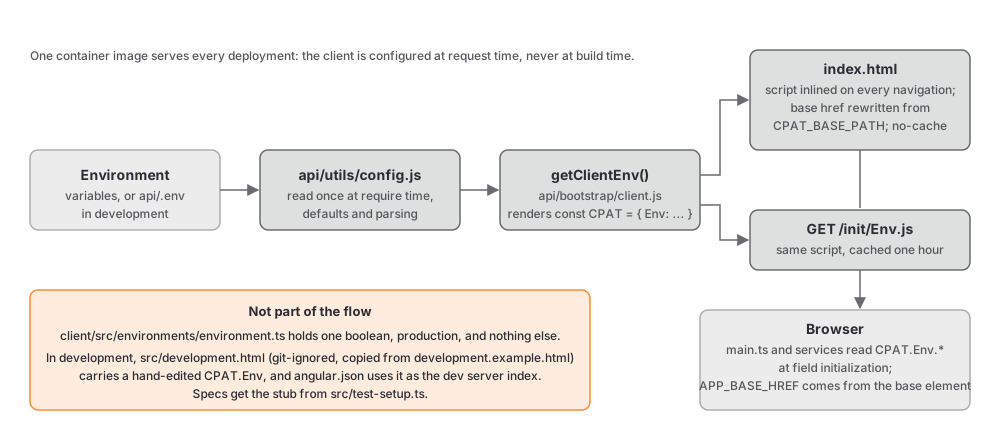
The client never reads a build-time setting for anything environment-specific. The API renders a global object, CPAT.Env, from api/utils/config.js in getClientEnv() (api/bootstrap/client.js), inlines it into index.html on every navigation, and serves it at /init/Env.js. The object is declared to TypeScript as declare let CPAT: any in src/typings.d.ts.
|
Source variable |
Read by |
|---|---|---|
|
|
Every HTTP service, at field initialization. |
|
|
|
|
|
|
|
|
|
|
|
Components that hide integration features. |
|
|
|
|
|
The classification banner, exports, the consent redirect, the footer. |
|
|
|
In development the dev server’s index page, src/development.html, carries a hand-edited copy of the object; it is git-ignored and created from src/development.example.html (see Set up a development environment). The template omits a few fields, such as basePath and adminInactivityTimeout, and the consumers default them with ?? or ||, so keep that habit when you read a new field. Specs get a stub of the object from src/test-setup.ts.
src/environments/environment.ts and its production twin hold one boolean, and main.ts uses it only to call enableProdMode(). Do not add settings there.
5.5. Authentication
main.ts configures two OIDC clients against the same authority, and the application requires both sessions before it renders a page:
|
|
|
|---|---|---|
Client id |
|
|
Scopes |
|
|
Post-login route |
|
none |
Both use the authorization code flow with PKCE (responseType: 'code'), refresh tokens, and silent renew through src/silent-renew.html, and both send an unauthorized user to /401 and a forbidden one to /403.
authInterceptor (core/auth/interceptor/auth.interceptor.ts) attaches a bearer token only to requests whose URL contains CPAT.Env.stigman.apiUrl or CPAT.Env.apiBase, choosing the stigman token for the former and the cpat token for everything else. authErrorInterceptor handles 401 responses: a jwt expired detail triggers one refresh of both sessions, shared through a module-level promise so that concurrent failures do not start parallel refreshes, and then retries the request; a jwt audience invalid detail sets the audience-validation-failed flag in sessionStorage and navigates to /401. When a refresh fails, the interceptor stores the current URL as auth-redirect-url and starts a new login.
AuthService (core/auth/services/auth.service.ts) runs checkAuthMultiple() at startup, loads the current user once the cpat session is valid, computes the user’s highest access level, and exposes the results as signals (user, accessLevel, authState) and as observables. It logs in the stigman client first, then cpat; it logs out in the same order, resets the signals, and clears the data cache. The sessionStorage flags change its behaviour: with audience-validation-failed set it makes no login attempts at all until the flag is cleared.
A consequence worth knowing when something is misconfigured: a STIG Manager client that is missing from the realm blocks the whole application, including pages that never call STIG Manager. See Authentication and Identity for the provider-side requirements.
5.6. State and change detection
Every component declares changeDetection: ChangeDetectionStrategy.OnPush. Under OnPush a component re-renders when an input changes, when an event fires in its template, or when a signal it reads changes. It does not re-render because a field was assigned inside an RxJS subscription, and Angular reports no error when that happens; the view just stays stale. The rule that follows is simple: anything a template reads is a signal. signal() for local state, computed() for derived values, input() and input.required() for inputs, model() for two-way bindings, output() for events, linkedSignal() for state that resets when an input changes, and toSignal() to bring an observable into a template.
Four excerpts show the house style. A presentational component with required inputs, from common/components/status-card/status-card.component.ts:
export class StatusCardComponent {
  readonly title = input.required<string>();
  readonly type = input.required<string>();
  readonly icon = input.required<string>();
}
An input with a transform and a linkedSignal that remembers whether data has ever arrived, from pages/poams/poam-grid/poam-grid.component.ts:
readonly poamsData = input<any[], any[] | null | undefined>([], { transform: (value) => value ?? [] });

private readonly _assetCountsLoaded = linkedSignal<{ vulnerabilityId: string; assetCount: number }[], boolean>({
  source: this.affectedAssetCounts,
  computation: (counts, previous) => (previous?.value ?? false) || counts.length > 0
});
A child editor with a two-way model and an output, from pages/poams/poam-details/components/poam-milestones/poam-milestones.component.ts:
table = viewChild<Table>('dt');
readonly poam = input<any>({ status: '' });
readonly accessLevel = input<number>(0);
readonly poamMilestones = model<Milestone[]>([]);
readonly assignedTeamOptions = input<any[]>([]);
readonly milestonesChanged = output<any[]>();
A router stream turned into a signal, from layout/components/app.layout.component.ts:
protected readonly currentUrl = toSignal(
  this.router.events.pipe(
    filter((event): event is NavigationEnd => event instanceof NavigationEnd),
    map(() => this.router.url)
  ),
  { initialValue: this.router.url }
);
Dependencies are injected with inject() in field initializers. Subscriptions that must end with the component use takeUntilDestroyed(this.destroyRef). RxJS remains the tool for HTTP calls and for streams that cross services, such as the authentication state and the selected collection; it is not the tool for component state.
One more pattern follows from the cache described below. A component that reloads when an input changes can receive responses out of order, because a cached response arrives at once while an earlier network response is still in flight. Those components keep a generation counter and drop results from superseded loads, as pages/admin/collections/collection-permissions/collection-permissions.component.ts does:
const gen = ++this.loadGeneration;

this.collectionsService
  .getCollectionPermissionDetail(collectionId)
  .pipe(
    catchError((error) => {
      if (gen !== this.loadGeneration) return EMPTY;
The same guard appears in the team sync component and in the STIG Manager integration components. Use it whenever a view can be reloaded before its previous load completes.
A reviewer’s checklist for this section:
Every value a template reads is a signal or an input; no plain field is assigned inside
subscribe.inject()rather than constructor parameters;takeUntilDestroyedon every long-lived subscription.A component that reloads on input change has a generation counter.
Derived values use
computed()rather than being recomputed in the template.
5.7. Services and HTTP
Every HTTP service injects HttpClient and reads the API base once, at field initialization, as private readonly cpatApiBase = CPAT.Env.apiBase;. Requests are plain HttpClient calls returning observables that components subscribe to or convert with toSignal.
Three services carry cross-cutting state. PayloadService (common/services/setPayload.service.ts) turns the current user into a payload with the user’s collections and access level, and exposes user, payload, accessLevel, and isAdmin as signals and observables. SharedService (common/services/shared.service.ts) is the gateway to the STIG Manager API and holds the selected collection and the tour trigger. IntegrationService (pages/integrations/integration.service.ts) is the gateway to the Tenable proxy operations. PoamService, UsersService, CollectionsService, and the other feature services are thin wrappers over their operations; CollectionsService keeps a small shareReplay cache of the collection lists that it invalidates on writes.
Errors are reported with getErrorMessage from common/utils/error-utils.ts, which prefers the API’s detail field, and shown through MessageService. There is one <p-toast> in app.component.html, bound to the root MessageService; components must not add their own, with the single exception of a keyed confirmation toast in the Tenable vulnerabilities page. Confirmations use the root ConfirmationService; dialogs use DialogService.
5.8. Upstream data caching
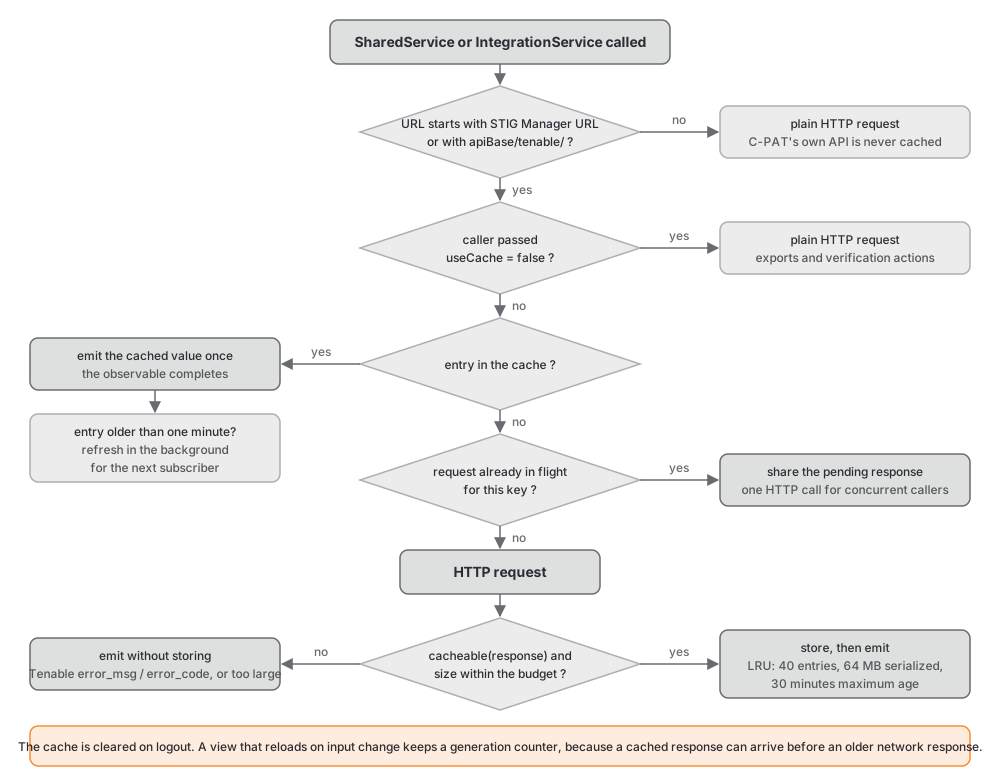
STIG Manager and Tenable reads are slow and are repeated across views, so DataCacheService (common/services/data-cache.service.ts) caches them in memory. Its rules, from the constants in the file:
An entry lives for 30 minutes.
The cache holds at most 40 entries and at most 64 MB of serialized JSON; the least recently used entry is evicted first, and a single response larger than the budget is delivered but not stored.
observe()emits exactly once: the cached value if there is one, otherwise the fresh response. When the cached value is more than a minute old, a background refresh updates it for the next subscriber.Concurrent requests for the same key share one HTTP call.
clear()runs on logout.
Consumers see ordinary single-emission observables and need no special handling. What decides whether a request is cached is a URL guard, not a convention. SharedService caches only URLs that start with the STIG Manager API URL:
private cached<T>(scope: number | string, url: string): Observable<T> {
  return url.startsWith(this.STIGMANAGER_URL)
    ? this.cache.observe<T>(this.stigmanKey(scope, url), () => this.request<T>(url))
    : this.request<T>(url);
}
IntegrationService caches only URLs that start with ${apiBase}/tenable/. The trailing slash is what keeps C-PAT’s own saved-filter operations, /tenableFilters/ and /tenableFilter/, out of the cache, so a new operation named /tenableSomething falls through to a plain request while /tenable/something is cached. It also passes a cacheable predicate that rejects responses carrying Tenable’s error_msg or error_code fields, because Tenable reports some failures with HTTP 200; such a response is delivered to the caller but never stored.
Nothing that originates from C-PAT’s own API is ever cached, and a new service method that hits a C-PAT endpoint falls through to a plain request by construction.
Some reads must be current. Exports, verification actions, and the origin lists in the collection dialogs pass false for the useCache parameter: postTenableAnalysis(params, false), getTenablePlugin(id, false), getTenableRepositories(false), getCollectionsFromSTIGMAN(false), and getAssetsFromSTIGMAN(id, false). getSTIGMANAffectedAssetsByPoam is never cached at all, and the POAM exports that call it deduplicate it per run with a Map of shareReplay observables keyed by benchmark, so that one export issues one request per benchmark. The one deliberate exception is the global metrics export, which reads the same cached metrics the dashboard just painted so that the workbook matches the screen.
A reviewer’s checklist for this section:
A new STIG Manager or Tenable read goes through
SharedServiceorIntegrationServiceand accepts auseCacheopt-out if any caller needs current data.Export paths, admin verification actions, and single-use bulk reads pass
false.A new C-PAT endpoint is never routed through the cache.
A view that reloads on input change carries a generation counter.
5.9. UI system
Components import the PrimeNG modules they use, one module per component type (TableModule, ButtonModule, SelectModule, and so on). Tailwind 4 is configured in src/assets/styles/global.scss with the CSS-first syntax: it loads Tailwind, registers the tailwindcss-primeui plugin, and defines the dark variant on the .p-dark class. Templates mix PrimeNG components with Tailwind utility classes for layout.
The theme is a PrimeNG preset. src/app/app-theme.ts defines Noir with definePreset on the Aura compatibility preset and exports it with darkModeSelector: '.p-dark'. The configurator in layout/components/app.configurator.component.ts lets a user switch preset, primary colour, and surface palette at runtime, and persists the choice on the user record. One rule follows from how it applies changes: it rebuilds the preset from getPresetExt(), so any override you add to the preset must also be returned from getPresetExt() or the first runtime change wipes it. Dark mode is a class on <html> managed by AppConfigService, which persists the state in localStorage under appConfigState; a blocking inline script in index.html and development.html applies the class before Angular boots so the page does not flash.
Three more conventions:
common/directives/multi-select.directive.tsattaches top-select[multiple]and adds a summary label and a select-all control. It reaches into PrimeNG’sSelectinternals, so review it after every PrimeNG upgrade.Charts: new work uses
cpat-chart(common/components/chart/), a wrapper over Chart.js.ngx-chartssurvives only in the advanced pie on the POAM pages and ECharts only in the uptime monitor.Tours use
ngx-ui-tour-primeng. Steps are anchored with thetourAnchorattribute in templates and started throughSharedService.startTour(), which the layout listens to.
ExcelJS is imported dynamically (await import('exceljs')) in the export services and listed in allowedCommonJsDependencies; a static import would put it in the initial bundle and break the budget below.
5.10. Build
angular.json defines two configurations. development, used by npm start, serves src/development.html as the index with source maps and no optimization. production, used by npm run build, uses src/index.html, replaces environment.ts with the production file, hashes output names, and enforces budgets: an initial bundle under 1.5 MB with a hard error at 2 MB, and component styles under 16 KB with an error at 32 KB. The output lands in dist/browser, which the API serves. npm run analyze builds with statistics and prints the largest inputs per chunk, which is the tool for finding what pushed the budget.
5.11. Conventions
Selectors are cpat- prefixed and kebab-case; the linter enforces it. Component files stay together in one folder. Templates use @if, @for, and @switch; no structural directive syntax remains. standalone: true still appears on most components; it is the default in Angular 22 and can be omitted in new code. The full list with the enforcing rules is in Coding standards.